Adobe Portfolio review: who it's for and when to outgrow it (2026)
A designer's Adobe Portfolio review: what it includes, what it really costs, where it runs out, and when to move to Framer. Facts checked 22 October 2026.
By Talha Riaz, UI/UX, brand and packaging designer
Updated , 8 min read
From my own work
Used Adobe Portfolio for years; it helped me win projects
I've used Adobe Portfolio for years and it helped me win many projects. It's simple, easy to navigate and easy to set up. It doesn't have a lot of customization. I wouldn't recommend it over Framer, but for anyone starting out it's the best direction. In the end it will reach its limitations and you'll need to move to another platform.
On this page
Adobe Portfolio is a website builder for creatives that comes with a Creative Cloud subscription. I’ve used it for years, and it helped me win projects. It’s the easiest way to get a portfolio online if you already pay for Adobe. It’s also a starting point rather than a place to stay, because it doesn’t give you much room to customize.
The first-hand parts of this review are mine. Prices, plan names and limits come from Adobe’s own pages, which I checked on 22 October 2026.
What it is
You pick a theme and build the site from it. Adobe offers two starting points: a “Collection of work”, which is a multi-page site with a collection and a contact page, and a “Welcome page”, a simple one-page site. Adobe says you don’t need to know HTML or CSS.
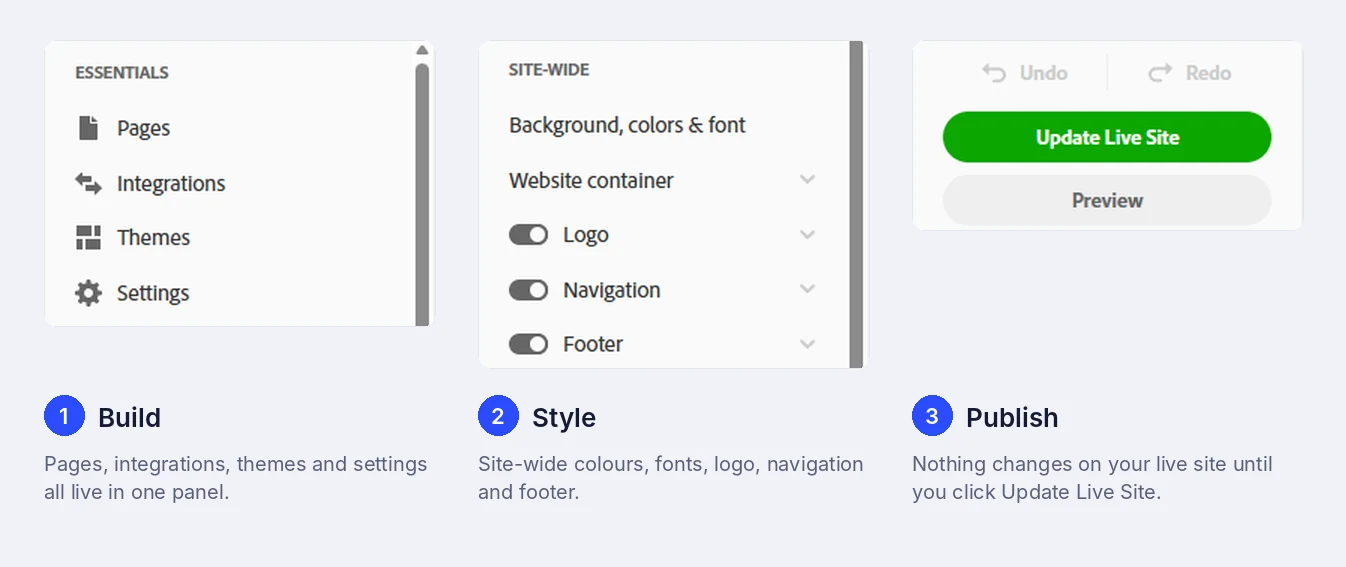
The editor is a single panel on the left with Pages, Integrations, Themes and Settings, plus Preview and Update Live Site buttons. That’s most of what you need to learn.
What you get
- Behance sync. Publish a project and tick the box to send it to your Behance profile. Adobe says custom pages don’t sync, only projects.
- Responsive themes. Each theme resizes for desktop, tablet and phone.
- Adobe Fonts, included with Creative Cloud.
- Lightroom photos and photo grids, if you show photography.
- Password protection for the whole site or selected pages, which is useful for work you can’t show publicly.
- Google Analytics and a custom domain.
- Unlimited galleries and custom pages, according to Adobe’s FAQ.
What it costs
You can’t buy Adobe Portfolio on its own. Adobe’s FAQ, last updated in June 2025, says it’s included in the Creative Cloud, Single App and Photography plans. Adobe’s Portfolio page says Creative Cloud access starts “as low as US$9.99 a month”, but it doesn’t say which plan that is.
On Adobe’s plans page today, the Photography plan is $19.99 a month (annual, billed monthly) and single apps such as Photoshop, Illustrator and InDesign are $22.99 a month. Creative Cloud Pro is $69.99 a month, with an introductory $34.99 a month for the first three months for new subscribers. Adobe’s current plans page doesn’t mention Portfolio by name, and the plan names have changed since its FAQ was written, so confirm with Adobe which plan includes it before you buy.
If you already pay for Adobe because you use Photoshop or Illustrator every day, Portfolio costs you nothing extra, and that’s the best reason to use it. If you don’t, compare it with Framer’s Basic plan, which is $10 a month on yearly billing and includes your own domain.
Using your own domain
Every Portfolio site comes with a built-in myportfolio.com address. A custom domain is optional, and Adobe’s help pages list two limits: you can connect only one domain per site, and you can’t point it at a specific page.
You can buy a domain inside Portfolio, where Adobe says it’s powered by Namecheap, or buy one elsewhere and connect it. Adobe says changes can take 24 to 72 hours to start working. I haven’t checked what Adobe charges for the domain, so look at the renewal price before you buy. I’d buy the domain myself so it isn’t tied to a builder. My guide to choosing a domain name for your portfolio covers what to pick and where.
Search settings
Under Settings, Search Optimization lets you set a website title and meta description, and switch indexing on or off. Custom meta tags are there too, marked as an advanced setting, and you can use them for Google Search Console verification. The catch is that Adobe says its automatic submission of site updates isn’t working for Google Search at the moment. Set up Search Console yourself and ask Google to recrawl after big changes.
Why I stayed on it for years
I’ve kept my Adobe Portfolio account for a long time, and three things made me stay.
- The address explains itself. Adobe’s default address looks like yourname.myportfolio.com. A client who opens it sees at a glance that it’s a portfolio and can start looking at the work. A bare personal domain doesn’t tell a stranger what they’re about to see.
- It stays simple. It lists all your projects, there are plenty of themes, and it never turned into a project of its own. It suits clear, simple project pages that show what you do and what you’ve worked on.
- The slow part isn’t the tool. Building the site was quick. What took the time was the content: making the graphics in Illustrator and writing all the copy.
None of that changes the limit below: the themes only go so far.
Where it runs out
This is the honest part. In my experience Adobe Portfolio doesn’t have a lot of customization. For a first portfolio that’s fine, and it keeps the editor simple. Eventually you’ll want something the themes don’t allow, and then you’ll need another platform.
Adobe documents a few specific limits too: one custom domain per site, no pointing a domain at a single page, and embeds that accept only iFrame code. If you keep the Behance sync on, your projects also live on Behance, so moving to another builder doesn’t leave you with nothing online.
Adobe Portfolio or Framer?
| Adobe Portfolio | Framer | |
|---|---|---|
| Cost | Included with a Creative Cloud plan | Basic is $10 a month on yearly billing |
| Own domain | Yes, one per site | Yes, on paid plans |
| Getting started | Quick, theme-based | Works like Figma, but takes a little while to learn |
| Customization | Limited, in my experience | A free canvas with components |
| Size limits | Unlimited galleries and custom pages, per Adobe | Basic: 30 pages, 2 CMS collections, 1,000 CMS items |
| Best for | A first portfolio when you already pay for Adobe | Designers who work in Figma and want more control |
I wouldn’t recommend Adobe Portfolio over Framer, and I say why in Is Framer good for a design portfolio?. The two aren’t rivals for everyone, though. If you already have Adobe, start on Portfolio for free and move when you outgrow it. If you don’t, start on Framer.
Who should use it
- Use Adobe Portfolio if you already pay for Creative Cloud, you’re building your first portfolio, you want to publish quickly, or you already show your work on Behance.
- Pick Framer if you want more control over the design, you don’t pay for Adobe, or you’re ready to learn a canvas tool.
- Not sure you need your own site at all? Read Behance vs your own portfolio site.
Whatever you build it on, the work you put in matters more than the platform. What to put in a UI/UX case study is a good next read, and Framer vs Webflow for designers is the next step when you’re ready to move.
Sources
- Adobe Portfolio FAQ, Adobe
- Adobe Portfolio, Adobe
- Creative Cloud plans and pricing, Adobe
- Connect a custom domain: overview, Adobe Portfolio Knowledgebase
- Buy a domain through Adobe Portfolio, Adobe Portfolio Knowledgebase
- Optimize your site for search engines, Adobe Portfolio Knowledgebase
- Add custom meta tags and verify site ownership, Adobe Portfolio Knowledgebase
The short version
What's good
- Included with a Creative Cloud subscription, so no extra cost if you already pay for Adobe
- Simple, easy to navigate and quick to set up
- Projects sync with Behance when you publish them
- Adobe Fonts, Lightroom photo import and password-protected pages are built in
- Adobe says you can add unlimited galleries and custom pages
What's not
- Not a lot of customization, so you'll outgrow it
- Not sold on its own: you need a Creative Cloud plan
- One custom domain per site, and it can't point to a specific page
- Embeds only accept iFrame code, not a plain URL or HTML
- Adobe says its automatic submission of site updates isn't working for Google Search
Questions people ask
Is Adobe Portfolio free?
It's included at no extra charge with a Creative Cloud subscription, but you can't buy it on its own. Adobe's FAQ says it's only available through its Creative Cloud, Single App and Photography plans, so you pay for one of those.
Can I use my own domain with Adobe Portfolio?
Yes. Every site starts on a myportfolio.com address, and you can connect your own domain. Adobe's help pages say you can connect only one domain per site and can't point it at a specific page. You can buy a domain inside Portfolio, where Adobe says it's powered by Namecheap, or connect one you bought elsewhere.
Does Adobe Portfolio sync with Behance?
Yes. When you publish a project in Portfolio there's a checkbox to sync it to your Behance profile, and the reverse works too. Adobe says custom pages don't sync, only projects. If you don't have a Behance account, Adobe creates one when you publish your first project, and you can change its privacy settings.
Is Adobe Portfolio good for SEO?
It covers the basics: a website title, a meta description, a switch that lets search engines index the site, and custom meta tags for advanced users, such as Google Search Console verification. Adobe also says its automatic submission of site updates currently isn't working for Google Search, so ask Google to recrawl your site yourself.
Can I embed a video or other content?
Yes, with limits. Adobe says embeds only accept iFrame embed codes, not an embed by URL or HTML, so check that the service you want to embed gives you an iFrame code.
When should I move from Adobe Portfolio to Framer?
When you want something the themes don't allow. In my experience you will reach that point eventually. If you work in Figma, Framer is the natural next step, and my guide to building a portfolio in Framer in a weekend walks through it.
Written by Talha Riaz
UI/UX, brand and packaging designer
Designer with 8+ years across UI/UX, brand identity and packaging, and 76 projects for clients in the US, UK and Middle East. I have used Adobe Portfolio for years, built a small portfolio in Framer, and helped a developer on Webflow client sites.
More about meHow I test toolsReport an outdated price or error